
A Blog with Tips & Tricks for Enlightened Presenters

Stop Replacing Yourself
Stop Replacing Yourself
In a virtual presentation, the deck doesn't just compete with you.

Eric Harris
August 21, 2026

“Can Everyone See My Screen?”
The odds are high someone sang this refrain to you at least once in the last week. Like a dinner bell for virtual presentations, this line has permeated corporate culture. The problem, though, is a dinner bell calls a hungry audience to the table.
When you ask this question, you’re actually driving your audience away.
And yet. Two thumbs go up in the grid, one person types yes in the chat, and everybody moves on.
Look at what you actually asked for, though. You asked a group of people you came here to persuade to confirm they can see the thing you brought instead of you. Then, when they said yes, you accepted the role of second in command.
The whole exchange takes about three seconds, but it sets the tone for your entire meeting. And, unfortunately, it’s based on a decision you never made, but rather inherited.
Hand identical slides to two people and you get two different meetings. The variable is the person. That’s what it means when we say you’re the medium for your ideas, and it’s the entire reason anybody bothers to show up live.
Presence runs on space. Movement, proximity, scale, a pause held longer than is comfortable. This format took the space already, and that rectangle is what’s left of you. When you click share the rectangle holding you drops to a stamp in the corner. You’ve swapped places with a document and you’re a narrator at best.
In a conference room the deck competes with you. Online, it replaces you.
The rough part is you can’t watch it happen, because the faces left the screen the second your slides arrived. In a physical room you’d see their eyes come up and you’d move when they did. On a video call you keep going, you finish, you feel fine about it. You have no idea.
They’re Already Working Harder than You Think
Every one of your audience members is already working overtime on this call. The job has a name, nonverbal overload, and in practice it’s small and constant. Keep your head inside the frame. Aim your eyes at a lens instead of a face. Nod hard enough that the nod survives the compression. Everything that feels natural in person now requires something extra of them.
Then you put a deck on it.
Learning research has a name for that part too, the redundancy effect, and the finding is blunt. People understand you worse when they’re reading your words while you say those same words out loud. It’s one message, but it’s routed through two pipes, and a listener has to keep checking one against the other, which drains the working memory they needed to follow you.
In a conference room they can absorb it. They’ve got some to spare. On a video call you’re billing people who are already overdrawn, right at the moment you need them sharp.
Same deck. Different arithmetic.
-
Does the idea need a visual to make sense? Ask yourself whether you could present over the phone. Most of the time, the answer is yes, and when it is, the visual is just decoration. How important is decoration if it costs you your place in the meeting?
-
Is the visual mostly words? If yes, then you can count on them reading it. Reading beats listening on speed and nobody can talk themselves out of it. You’ve handed them the ending and asked them to sit through the middle.
-
Can they get it in thirty seconds? Anything slower is a document. Documents are useful. They just do their work before the meeting or after it.
-
Would sending it ahead work just as well? Then send it, and keep the live time for the part they can’t get on their own.
Sometimes the answer really is to share your screen. A chart where the shape of the line is the argument. A floor plan. A logo design. Those earn the screen, and they earn it for about thirty seconds.
There are two ways out of this: Don’t share, and say it out loud instead. Or share, watch it land, take it down, and get back to talking.
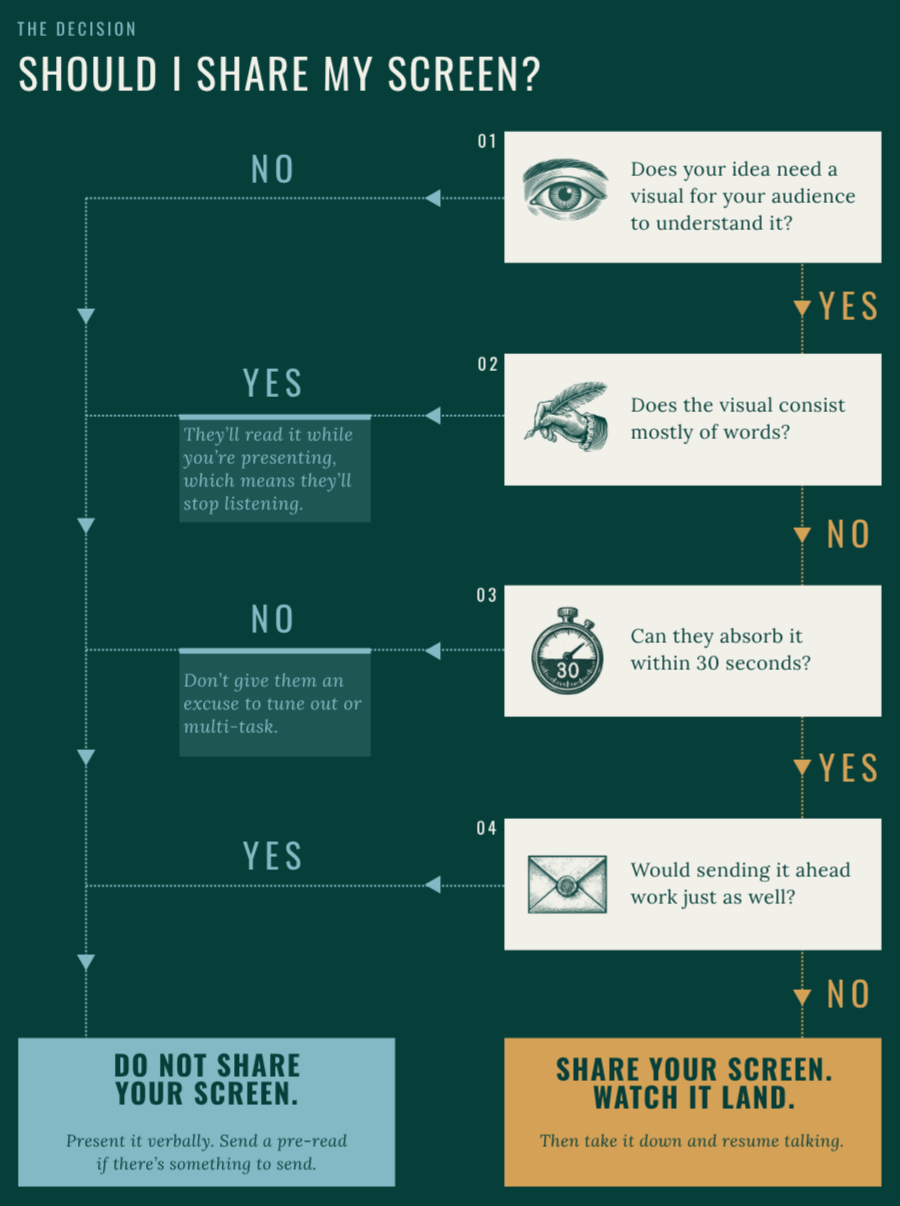
You might want to screenshot this one.
If you do share, clear the desktop, close the tabs, and open the one window well before you start. Hunting for it live is the most expensive ten seconds in the meeting.
And the first time you tell a group there’s nothing going on the screen today, rid yourself of the guilt or shame that shows up like you forgot something. Own it, knowing you’re doing your audience a favor. And knowing nobody has ever walked out of a meeting quoting a slide.
Have a High-Stakes Virtual Presentation Coming Up?
Is there a deck because the idea needs one, or because there’s always a deck?
Could you do it over the phone?
And when you reach for “share,” is the deck there for them, or so you don’t have to be?
“It seems that perfection is finally attained not when there is no longer anything to add, but when there is no longer anything to take away.”
“But We Always Show Our Slides!”
You’ll run through the decision tree, you’ll commit to a deckless presentation, and then somebody will ask you to build the deck ahead anyway. Sigh.
GatherRound’s Guide to Virtual Presentations is designed to equip you and your backbone to respond in those moments. Page 26 is an entire arsenal of such language. What to say when they ask for the deck in advance. What to say when they ask why there aren’t slides. What to say when somebody tells you this isn’t how we do it here. One sentence each, so you’re not writing them in your head with an audience waiting.
In a virtual presentation, just like in-person, you control more than you think.
Want the decision tree on its own? You’ll find it here.
Did someone forward this to you? The whole argument lives at gatherround.us/virtual-presentations.
🔥 Hi, I’m Eric, and every week, I share insights, observations and tools so you can ditch decks and light a fire in your high-stakes presentations. If you like what you see here, follow me on LinkedIn.